
What Are SPF, DKIM, and DMARC? Email Authentication Explained
9 min read | June 29, 2026 | CertaDNS Team
You hit send on an important proposal, invoice, or customer update. Then it disappears into spam, where the recipient may never see it.
Or the opposite happens: a scammer sends a convincing message that looks like it came from your domain. Your name is in the From line, but you never sent it. Customers are left wondering whether they can trust your business.
SPF, DKIM, and DMARC are the email authentication standards that help solve both problems. Together, they give receiving inboxes evidence that a message really came from an approved sender, has not been altered along the way, and is allowed to use your domain. They support better deliverability and make it much harder for someone to impersonate you.
Email authentication is not a magic inbox-placement switch. It cannot fix poor list practices or a damaged sending reputation, but it gives legitimate mail the proof it needs to be recognized as legitimate.
The core problem: email was built to trust anyone
Email was designed for an earlier internet. A sender can put almost any address in the visible From line, much like writing any return address on an envelope. Without extra checks, recipients have limited proof that the sender is authorized to use your domain.
That gap creates two familiar headaches:
- Spoofing: A criminal sends a message that appears to come from
you@yourcompany.com. - Deliverability problems: A legitimate platform sends on your behalf, but receiving inboxes cannot confidently connect it to your domain.
Authentication closes the gap with DNS, the system that tells the internet where services for a domain live. You publish a few records in DNS. Receiving mail systems read them and use them as instructions for evaluating your message.
SPF (Sender Policy Framework)
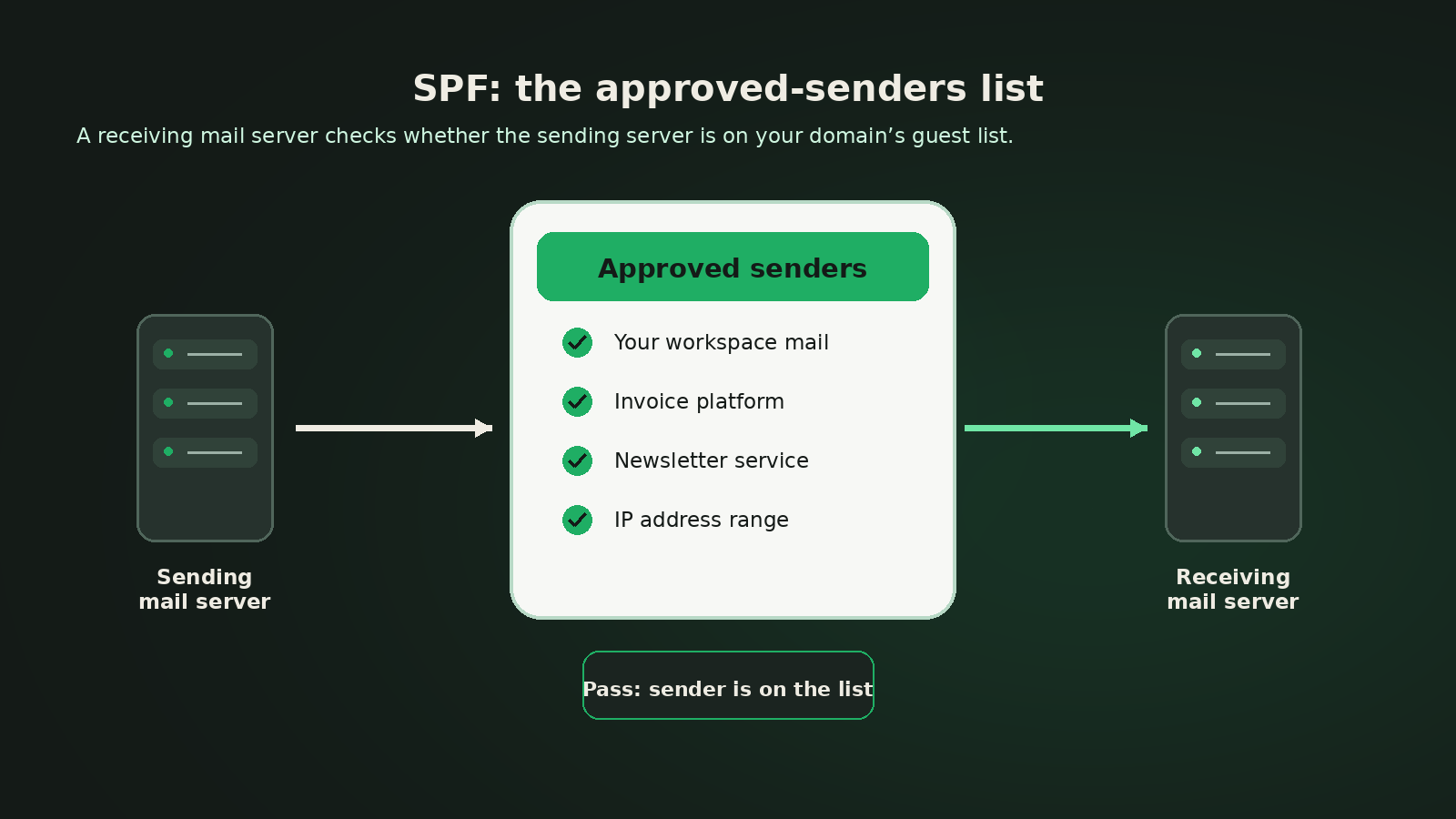
SPF, short for Sender Policy Framework, is your approved-senders list. It tells the world which mail servers and sending services are allowed to send email using a domain in the email delivery process.
Think of a mailroom receptionist with a guest list. A courier arrives saying they are there for your company. The receptionist checks the list. If the courier is listed, they are allowed through. If not, the receptionist has a reason to be suspicious.
What SPF actually checks
SPF checks the domain used during mail delivery, usually called the envelope sender or return-path domain. It does not automatically validate the address a person sees in the From line.
That distinction matters. A message can have an SPF pass for one domain while displaying another domain in the From line. DMARC, covered below, adds the missing connection by requiring the domains to line up.
What an SPF record looks like
An SPF record is published as a DNS TXT record. A simplified example looks like this:
v=spf1 ip4:198.51.100.24 include:spf.mailer.example ~all
In plain English, that says: “This IP address and the service referenced here may send for this domain. Other senders should be treated with caution.”
The SPF gotcha: the 10-DNS-lookup limit
SPF can become fragile when it relies on too many nested include, redirect, a, mx, or similar lookups. During evaluation, receiving mail systems are limited to 10 DNS-triggering SPF lookups. Going over the limit can produce a permanent SPF error, which undermines the authentication you were trying to establish.
This is easy to miss. One clean-looking SPF record can lead to several more records behind the scenes, especially after you add multiple sending platforms over time.
DKIM (DomainKeys Identified Mail)
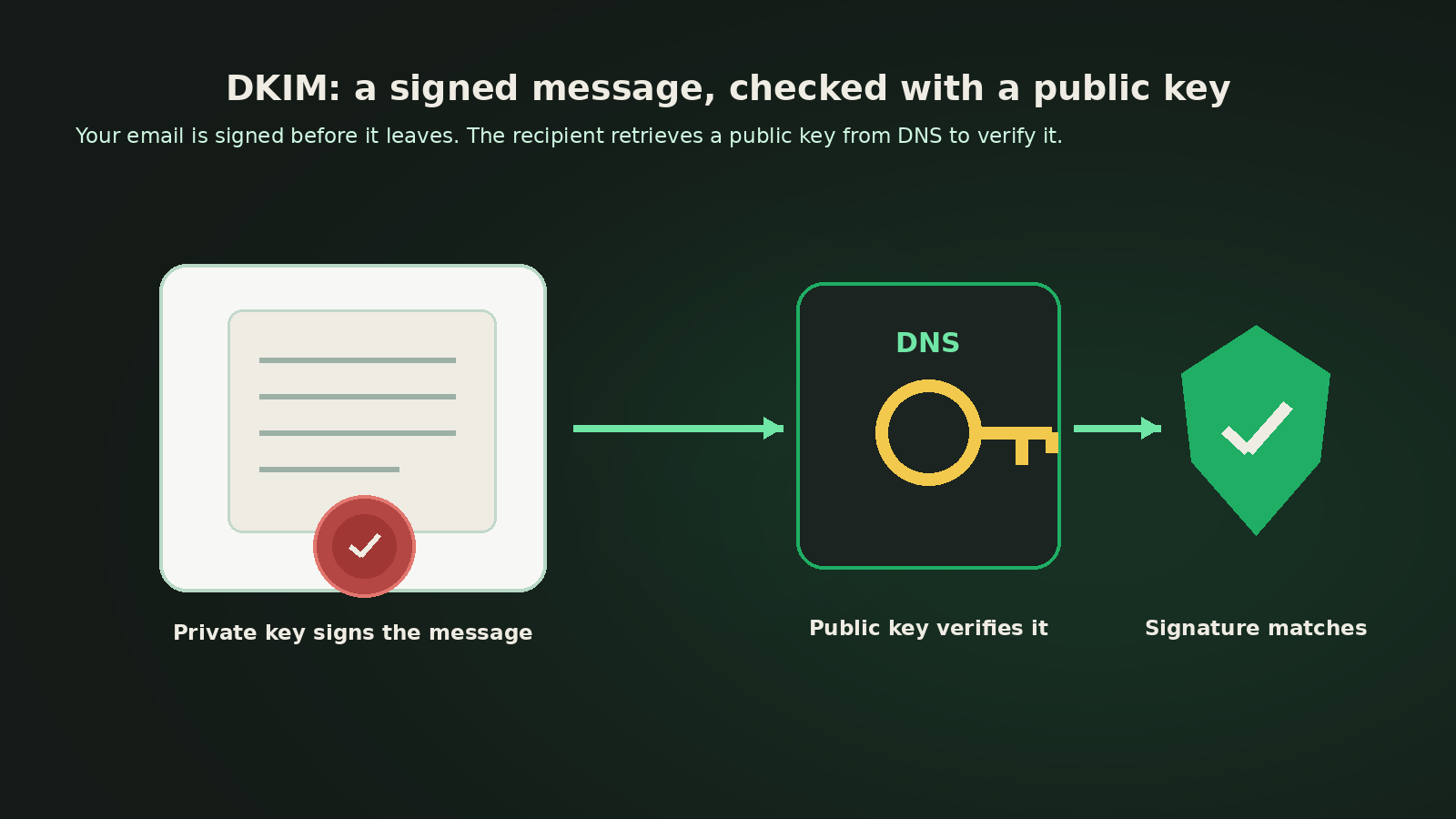
DKIM, short for DomainKeys Identified Mail, adds a digital signature to your email. It gives a receiving mail system a way to verify that key parts of the message were signed by an authorized sender and were not changed after signing.
The simplest analogy is a tamper-proof wax seal on a letter. Your sending system applies the seal before the letter leaves. The recipient checks it against a reference that you publish. A valid match shows the message has a trustworthy signature; a broken or missing match raises a flag.
Public key, private key, and selectors
DKIM uses a key pair:
- The private key stays with the sending system and creates the signature.
- The public key is published in DNS and lets receiving systems verify that signature.
The public key is stored under a name that includes a selector, such as marketing._domainkey.yourdomain.com. Think of the selector as a label that lets you use more than one key at a time or identify which sending stream signed a message.
Why DKIM key rotation matters
Like a physical key, a DKIM private key should not live forever. A safe rotation publishes a new selector, begins signing with it, keeps the older public key available long enough for mail in transit, then retires the old key. Manual DNS updates make the timing easy to get wrong.
DMARC (Domain-based Message Authentication, Reporting & Conformance)
DMARC, short for Domain-based Message Authentication, Reporting & Conformance, is the policy layer. It builds on SPF and DKIM, tells inbox providers what you want them to do when a message fails your checks, and gives you visibility into mail sent using your domain.
Its most valuable idea is alignment. For DMARC to pass, at least one of SPF or DKIM must pass and be aligned with the domain in the visible From address. Alignment is what prevents a sender from passing SPF or DKIM for an unrelated domain and then displaying your domain to the recipient.
The DMARC policy ladder
DMARC lets you move from visibility to enforcement at a pace that makes sense for your business:
p=none: Monitor without asking inboxes to block mail based on your policy.p=quarantine: Ask inboxes to treat failing mail with extra caution, often by filtering it to spam or junk.p=reject: Ask inboxes to refuse messages that fail DMARC.
Receiving inboxes make the final delivery decision, but a correctly configured policy gives them a clear signal from the domain owner.
DMARC reports turn mystery into evidence
DMARC can request aggregate reports from participating inbox providers. Those reports show who attempted to send as your domain, which checks passed or failed, and what policy was applied.
The raw reports are typically XML files. A readable view of your sending sources matters before you move from monitoring to quarantine or reject.
How they work together
SPF, DKIM, and DMARC are not three separate chores. They are three checks in one decision path.
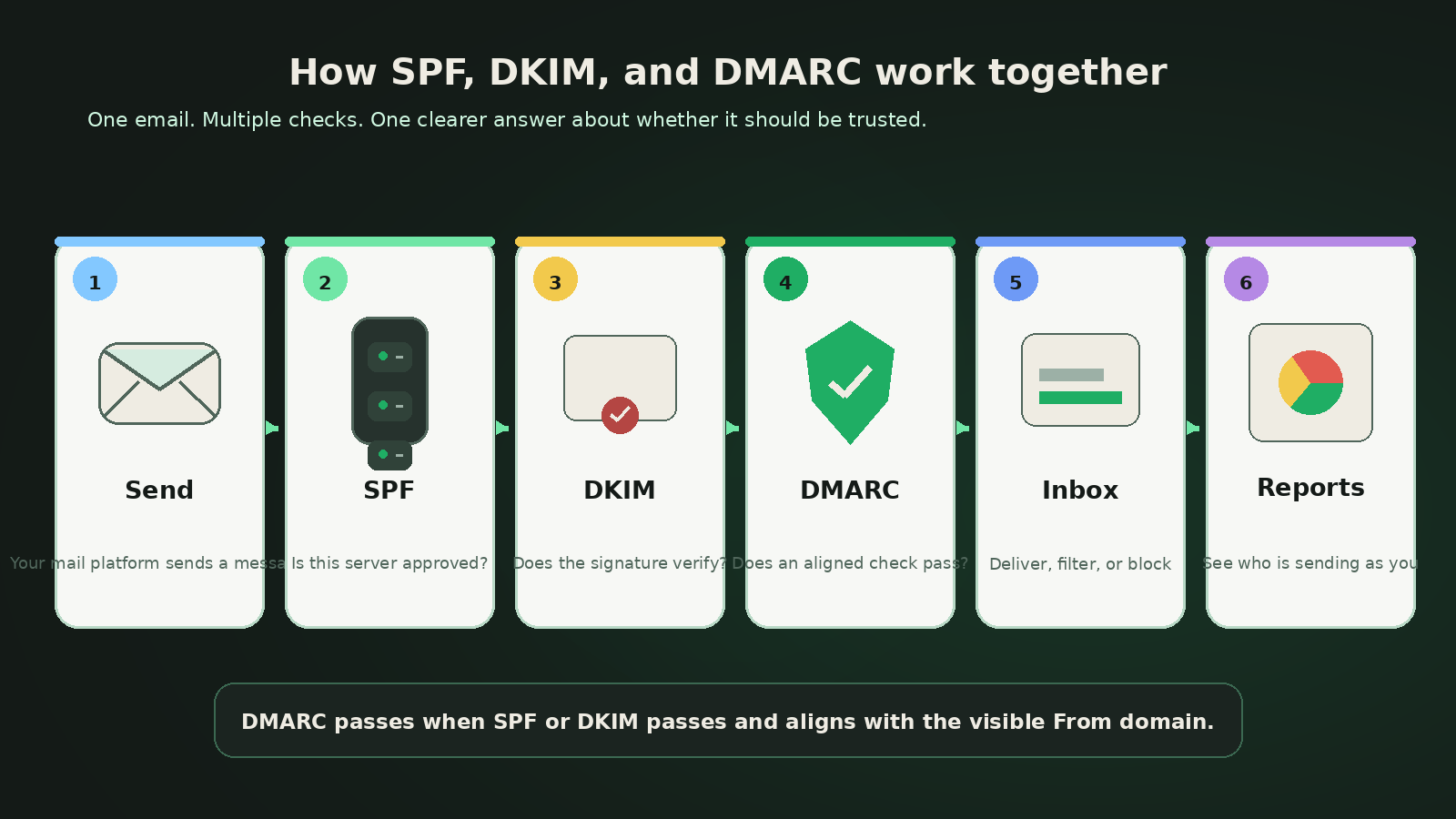
- Your email platform sends a message using your domain.
- SPF checks the sending server against the approved-senders list in your DNS.
- DKIM checks the signature using the public key published in your DNS.
- DMARC checks alignment between the visible From domain and the domain that passed SPF or DKIM.
- The receiving inbox applies your DMARC policy if the message fails.
- DMARC reports help you review the result and find legitimate services or suspicious senders.
Going further: BIMI and MTA-STS
Once your authentication foundation is in place, two optional standards can add more trust and control.
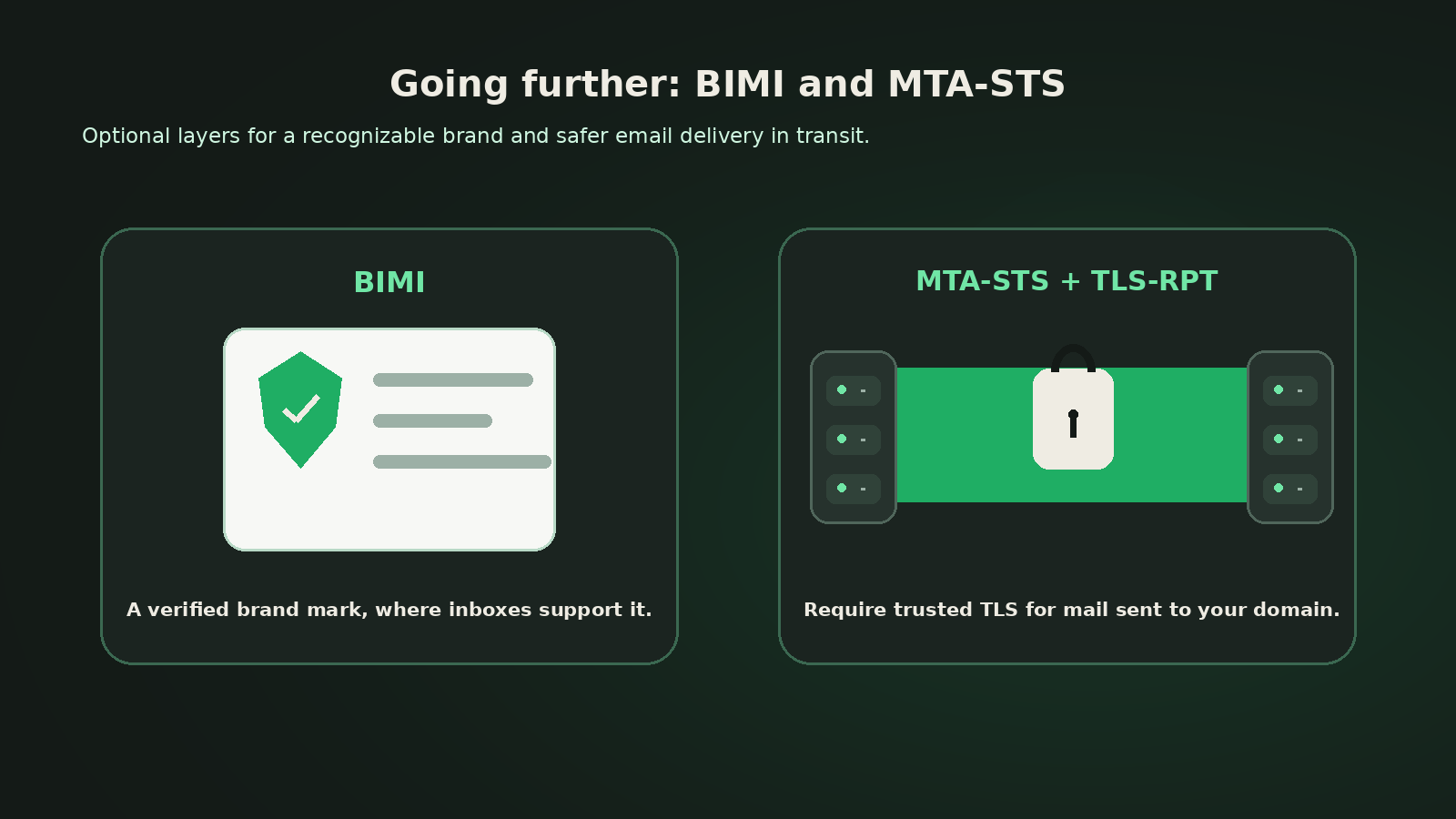
BIMI: your verified logo in supported inboxes
BIMI, short for Brand Indicators for Message Identification, can allow a verified brand logo to appear next to your mail in inboxes that support it. It helps people recognize legitimate messages more quickly.
BIMI is not just a logo upload. It depends on enforced DMARC, and inbox support varies. Treat it as a credibility layer you add after SPF, DKIM, and DMARC are working well.
MTA-STS and TLS-RPT: safer mail in transit
MTA-STS, short for Mail Transfer Agent Strict Transport Security, tells other mail systems that deliveries to your domain should use secure Transport Layer Security, or TLS, with a trusted certificate. It helps prevent downgrade problems where a connection might otherwise fall back to less secure delivery.
TLS-RPT, short for TLS Reporting, can send reports about transport-security failures. MTA-STS protects the path to your receiving mail system. It complements SPF, DKIM, and DMARC, but it does a different job.
Common mistakes that quietly break email
Email authentication failures are often ordinary configuration mistakes, not dramatic attacks. Keep an eye out for these:
- Publishing more than one SPF record for the same domain.
- Adding a new sending platform and quietly exceeding SPF's 10-lookup limit.
- Assuming an SPF pass alone proves the visible From address is legitimate.
- Publishing a DKIM key under the wrong selector or removing an old selector too soon.
- Moving to
p=rejectbefore you have identified every legitimate service that sends as your domain. - Staying at
p=noneforever and never using DMARC to enforce protection. - Ignoring DMARC aggregate reports because the XML is hard to read.
- Forgetting that subdomains and separate mail streams may need their own plan.
Why CertaDNS
Email authentication should not require memorizing DNS syntax, chasing nested SPF includes, rotating cryptographic keys, or deciphering XML attachments.
CertaDNS takes you from “we should do this” to a defensible setup without turning DNS into a trial-and-error project. Get guided SPF, DKIM, and DMARC setup without hand-editing raw DNS; SPF flattening that keeps your policy under the lookup limit; and DKIM key management and rotation handled for you.
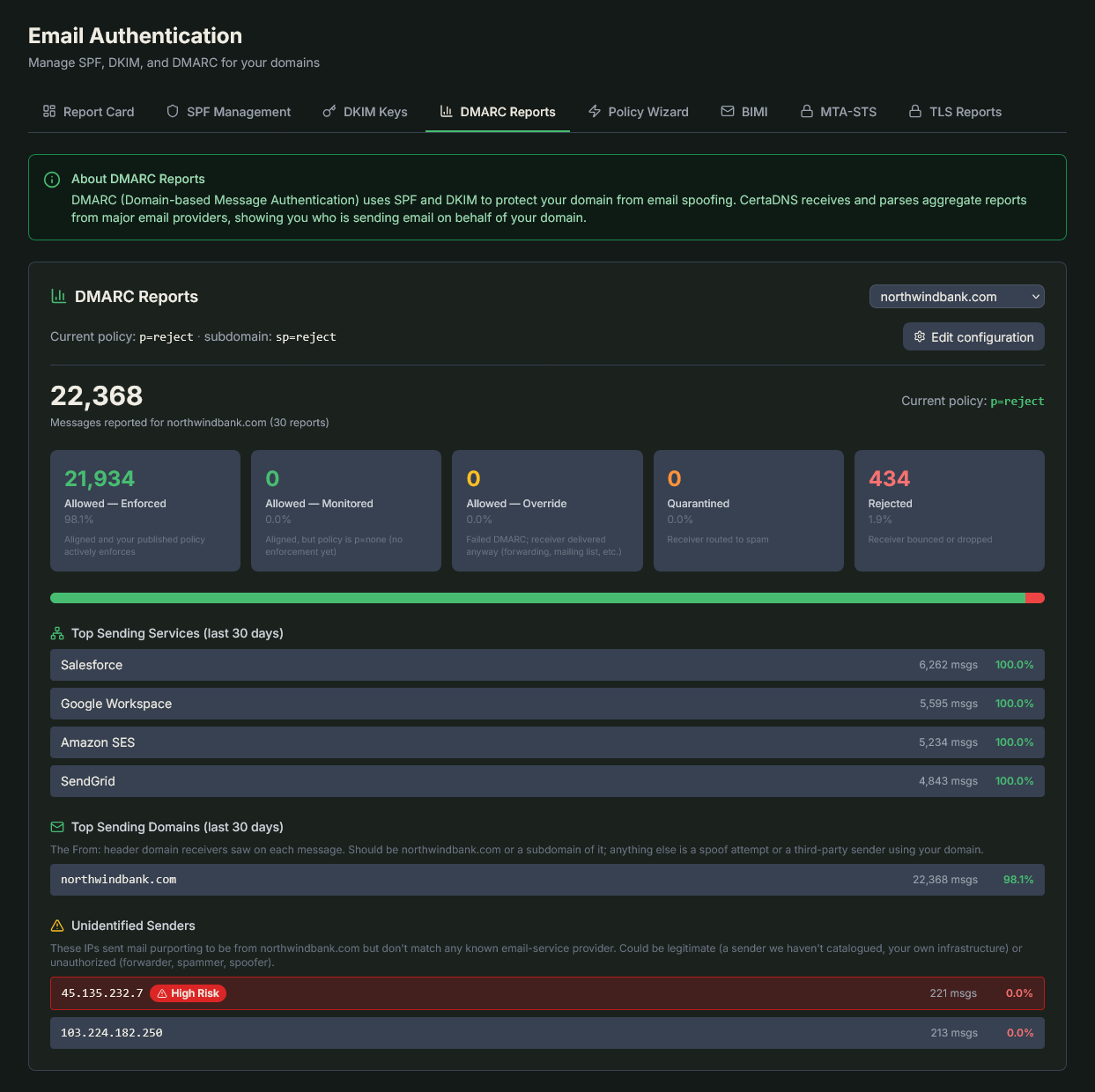
CertaDNS decodes DMARC aggregate reports into a readable dashboard — who's sending as your domain, what's passing, and which unknown senders to watch.
Use a DMARC policy wizard that guides a safer progression from monitoring to quarantine to rejection. Instead of opening raw aggregate-report XML, see pass/fail disposition, identified and unidentified senders, and sources worth a closer look.
CertaDNS also supports BIMI and MTA-STS with TLS-RPT. Email authentication is priced affordably per domain, so you can protect the domains that matter without a large management burden.
Put your domain back in control
SPF, DKIM, and DMARC are the foundation of trustworthy email. They help inbox providers recognize your legitimate mail, make spoofing much harder, and give you a practical way to see who is trying to send as your domain.
The safest path is not to publish a reject policy on day one. Start by discovering every legitimate sender, then enforce with confidence when the evidence is clear.
Start with CertaDNS and give your domain a clearer, safer way to send email.